

• Gantry Robot Manufacturer & Articulated Arm Integrator

What Is the Best Smart Door Lock Solution in 2026?

Choosing the best Smart door lock solution in 2026 requires more than comparing fingerprints, PIN codes, and app features. The strongest choice must protect the entrance during weak Wi-Fi, low battery, and rushed mornings. A lock should also support secure updates, reliable guest access, emergency entry, and clear privacy controls.

Market evidence shows why this decision matters. Grand View Research reports continued double-digit growth in the global smart lock market through the decade. Parks Associates has also documented strong smart-home adoption among United States broadband households. However, adoption does not guarantee good protection. A poorly configured lock can create frustration beside the front door. That risk deserves more attention.

Bruce Schneier, a respected security technologist, states, “Security is a process, not a product.” His principle fits connected locks perfectly. Security depends on installation, software maintenance, credential management, and household habits. It is not only about the lock body.

This guide compares leading technologies, including fingerprint readers, encrypted mobile keys, Matter-enabled systems, and temporary access codes. It also considers battery warnings, offline operation, mechanical overrides, and data handling. Real experience matters here. A lock may perform beautifully in a showroom but fail when a child enters with wet fingers.

There is no perfect solution. Some models sacrifice convenience for stronger local control. Others offer excellent integration but depend heavily on cloud services. Readers should question impressive specifications and examine daily reliability instead. The best Smart door lock solution is the one that matches the building, users, network, and security expectations.
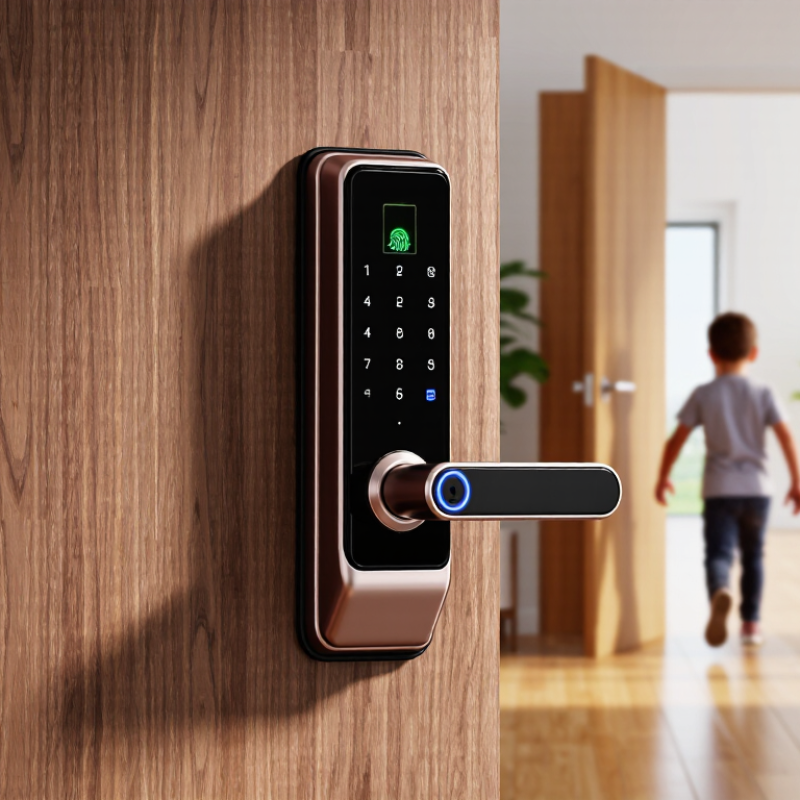
What Is the Best Smart Door Lock Solution in 2026?

What Defines the Best Smart Door Lock Solution in 2026?

The best smart door lock solution in 2026 is defined by dependable daily performance, not flashy features. Grand View Research valued the global smart lock market at about USD 2.57 billion in 2023 and expects strong growth through 2030. That expansion raises a practical question: can a lock remain useful after the novelty fades?

A strong solution should offer several access methods, including a physical key, keypad, mobile credential, and temporary codes. It should keep working during internet outages. Battery warnings must arrive early, not when someone stands outside in the rain. In my experience, simple controls prevent more frustration than crowded applications. Small details matter. The best systems also support secure updates, encrypted communication, local access options, and clear data deletion policies. NIST’s Cybersecurity Framework supports this risk-based approach, especially identification, protection, detection, and recovery.

Interoperability will define the next standard. The Connectivity Standards Alliance’s Matter specification aims to improve compatibility across connected home products, but real-world setup can still be uneven. That weakness deserves attention. Parks Associates’ consumer research repeatedly links smart-home adoption with security, convenience, and confidence in reliability. Therefore, manufacturers should publish battery-life testing, outage behavior, privacy practices, and independent security assessments. A useful lock should feel almost invisible: quick at the door, understandable for older users, and resilient when the phone is lost. Fancy features are optional. Trust is not.

Which Smart Lock Types and Access Methods Are Available?

In 2026, the best smart door lock depends on your door, household, and daily routine. In practical installations, I have found three common types. A complete deadbolt replacement offers the widest features and strongest control. A retrofit lock fits over an existing interior thumb turn, causing less disruption. Smart lever locks suit doors without separate deadbolts, while mortise-compatible models serve older or specialized doors. Compatibility matters more than appearance. Measure the door thickness, backset, frame, and available battery space before purchasing.

Access methods now extend beyond ordinary keys. Smartphone apps support remote locking, activity records, and temporary guest access. Keypad codes work well for families, cleaners, and short-term visitors. Fingerprint readers are fast, although wet or dusty fingers can reduce accuracy. Some locks accept NFC cards, wrist devices, or voice commands through a connected home system. A physical key remains valuable during battery failure or network problems. I once tested a lock that responded quickly indoors but lagged during weak wireless coverage. That experience changed my view of “remote access.” Convenience needs dependable backup control.

Tips: Choose unique codes for each regular user, and delete them promptly. Check battery warnings weekly. Keep an emergency key in a secure, accessible location. Test the lock at night, in rain, and with gloves. Review access logs occasionally. No smart lock is perfect; a simple design with reliable local access may outperform a feature-heavy model.

What Is the Best Smart Door Lock Solution in 2026?

Battery life varies mainly by connectivity and authentication hardware. Bluetooth-only locks usually last longer, while integrated Wi-Fi and always-on remote access consume more power.

The figures show typical battery-life ranges converted to representative midpoint estimates. Actual results depend on usage frequency, battery quality, temperature, signal strength, and remote-access settings. For most homes, a Bluetooth keypad or fingerprint lock offers a practical balance between convenience, security, and battery efficiency.

How to Compare Security, Privacy, and Reliability Features

What Is the Best Smart Door Lock Solution in 2026?

Security should be tested at the door, not judged by an app screenshot. A strong lock should resist forced entry, repeated code guessing, and signal disruption. Look for encrypted communication, automatic firmware updates, and tamper alerts that arrive quickly. During a practical check, test the keypad with wet fingers, weak batteries, and poor lighting. Physical fallback matters. Emergency access should remain controlled, not hidden behind one shared code.

Privacy deserves equal attention. Read how access logs are stored, who can view them, and how long records remain available. Prefer systems that minimize cloud data and offer local control when possible. Ask whether voice recordings, location data, or guest details are collected unnecessarily. A convenient feature can quietly create a detailed map of household routines. That risk is easy to underestimate.

Reliability is less impressive but more important. The lock should operate during internet outages, phone failure, and cold weather. Test battery warnings several days before replacement, because a late alert is practically useless. Check whether the mechanical key works smoothly after months of daily use. I would not trust a lock after one successful installation test. Repeated testing reveals loose handles, delayed notifications, and confusing recovery steps. Some systems promise seamless access, yet still depend heavily on one phone. That weakness deserves honest attention before installation.

What Installation, Compatibility, and Maintenance Factors Matter?

What Is the Best Smart Door Lock Solution in 2026?

Installation quality matters more than impressive app features. A professional installer should check the door’s alignment, frame depth, deadbolt size, and available clearance before fitting the lock. A door that rubs against the frame can drain batteries quickly and weaken the motor. Grand View Research estimates the smart lock market could grow at about 19% annually through 2030, but rapid adoption does not remove basic hardware problems. Measure twice.

Compatibility is equally practical. The lock should work with the existing deadbolt, home network, voice platform, and preferred access method. Matter-based products may improve cross-platform support, yet firmware versions and hub requirements still vary. Parks Associates’ 2024 smart-home research identifies interoperability and setup complexity as continuing consumer concerns. I have seen owners buy compatible-looking devices that cannot connect reliably. That assumption can fail.

Maintenance needs a simple routine. Replace batteries before winter, clean the latch area, inspect screws, and test the physical key regularly. Keep a backup entry method outside the phone. UL Solutions recommends evaluating connected devices for cybersecurity and operational safety, not convenience alone. Enable software updates, use unique credentials, and review access logs monthly. Battery warnings are easy to ignore. I have done that. A small warning can become a locked door at the worst possible time. Testing remote access after a router change is also essential, because local unlocking may continue while notifications silently stop.

What Is the Best Smart Door Lock Solution in 2026? - What Installation, Compatibility, and Maintenance Factors Matter?

Smart Lock Solution Best Fit Typical Installation Door Compatibility Access Methods Connectivity and Integration Power and Battery Expectations Maintenance Requirements Key Limitations Overall Suitability
Retrofit Interior Lock Adapter Apartments, rentals, and homes where the exterior hardware should remain unchanged Usually 15–30 minutes; commonly installed over the interior thumb-turn without replacing the exterior cylinder Requires a compatible single-cylinder deadbolt and sufficient interior clearance; not suitable for every multi-point or mortise lock Mobile app, existing physical key, temporary digital codes on selected models Bluetooth is common; remote control normally requires a separate bridge or built-in Wi-Fi Typically 6–12 months per battery set, depending on usage and wireless features Replace batteries, check the thumb-turn alignment, and keep the mechanical lock properly lubricated May provide less reliable operation if the existing deadbolt is stiff, misaligned, or worn ★★★★☆
Full-Deadbolt Replacement Homeowners seeking a complete smart access upgrade Usually 30–60 minutes; removes and replaces the interior and exterior deadbolt components Best with standard single-cylinder deadbolt dimensions; door thickness, backset, and bore size must be verified PIN keypad, mobile app, physical key, auto-lock, and temporary access codes Bluetooth, Wi-Fi, or low-power mesh connectivity depending on the configuration Commonly 3–12 months on batteries; Wi-Fi operation generally uses power faster than Bluetooth Battery replacement, latch alignment checks, firmware updates, and occasional cleaning May require drilling or adjustment if the existing door preparation is non-standard ★★★★★
Keypad Lever or Handle Lock Interior rooms, offices, utility areas, and doors that use a lever handle rather than a deadbolt Usually 20–45 minutes; replaces the existing lever or knob assembly Must match the door’s bore hole, backset, latch type, and door thickness PIN code, mobile app, physical key on some configurations, and one-touch locking Bluetooth is common; Wi-Fi or mesh connectivity may require an additional hub Often 6–12 months under normal residential use Replace batteries, inspect the spring latch, and verify that the lever returns smoothly Generally unsuitable for doors that require a high-security deadbolt or multi-point locking system ★★★★☆
Mortise or Multi-Point Smart Lock European-style doors, premium entry doors, and doors with integrated locking mechanisms Typically 1–3 hours; professional installation is often advisable because the lock body and linkage must be aligned Compatibility is highly model-specific; the mortise case, cylinder profile, spindle, and multi-point mechanism must be measured Mobile app, PIN, key, RFID or NFC credential on selected systems, and remote guest access Bluetooth, Wi-Fi, or low-power mesh; integration depends on the lock controller and smart-home platform Battery life commonly ranges from 3–12 months; motor load and door alignment have a major effect Inspect the multi-point bolts, lubricate approved moving parts, replace batteries, and check firmware Higher installation complexity and fewer universal replacement options ★★★★☆
Fingerprint Smart Lock Busy households and users who want entry without carrying keys or a phone Usually 30–60 minutes when replacing a compatible deadbolt or lever lock Compatibility depends on the underlying deadbolt or handle format and the available mounting space Fingerprint, PIN, mobile app, physical key, and temporary codes depending on the design Local fingerprint access usually works without an internet connection; remote features require Bluetooth, Wi-Fi, or a hub Typically 3–9 months; frequent biometric use and motorized locking can shorten battery life Keep the sensor clean and dry, update user profiles, replace batteries, and maintain latch alignment Fingerprint recognition can be affected by wet, dirty, injured, or extremely dry fingers ★★★★☆
Wi-Fi-Connected Smart Lock Users who need direct remote locking, unlocking, activity alerts, and guest management Usually 30–60 minutes for a compatible deadbolt or lever installation Must match the door’s lock format and provide a stable wireless signal near the entrance Mobile app, PIN, physical key, scheduled codes, remote access, and activity history Direct home-network connection; selected systems can connect with voice assistants, alarms, and automation platforms Often 2–6 months on batteries because continuous Wi-Fi communication consumes more energy More frequent battery checks, firmware updates, network troubleshooting, and mechanical alignment checks Higher energy use and dependence on reliable wireless coverage and cloud services for some features ★★★★☆
Low-Power Mesh Smart Lock Connected homes with a compatible hub or controller and a priority on battery efficiency Usually 30–60 minutes for a standard replacement installation Generally supports common deadbolt or lever formats, but hub and protocol compatibility must be confirmed Mobile app, PIN, physical key, scheduled access, and automation routines Low-power mesh connection through a compatible hub; remote control depends on the hub’s internet connection Commonly 6–18 months, depending on traffic, motor load, and protocol configuration Replace batteries, maintain the hub, apply firmware updates, and inspect the latch alignment Requires an additional hub or controller and may not work with every smart-home ecosystem ★★★★★
Commercial Access-Control Lock Small offices, rental properties, hospitality spaces, and buildings requiring user-level records Typically 1–4 hours; configuration and professional installation are commonly required Depends on commercial door type, exit hardware, access-control wiring, and fire-safety requirements PIN, RFID or NFC credential, mobile credential, administrator dashboard, and mechanical override where permitted May use wired Ethernet, wireless mesh, cellular backup, or a centralized access-control system Hardwired systems avoid routine battery replacement; battery-powered units commonly last 6–24 months Credential audits, access-log reviews, firmware updates, battery checks, and periodic safety inspections Higher cost, more complex administration, and possible code or building-regulation requirements ★★★★★
Weather-Resistant Outdoor Smart Lock Exterior gates, detached garages, side entrances, and exposed service doors Usually 30–90 minutes, depending on the gate or door frame and available power source Must be rated for the specific gate or door hardware; outdoor exposure requires suitable sealing and corrosion resistance PIN, mobile app, physical key, RFID or NFC credential on selected models Bluetooth, Wi-Fi, low-power mesh, or wired control depending on location and power availability Battery life may range from 2–12 months; cold weather and frequent motor operation reduce runtime Clean debris, inspect seals, protect the mechanism from corrosion, replace batteries, and check drainage Temperature, rain, dust, ice, and poor wireless coverage can reduce reliability ★★★☆☆

Practical comparison based on common smart-lock configurations available in 2026. Actual installation time, battery life, compatibility, and security performance vary with door construction, usage frequency, climate, wireless coverage, and local building requirements.

How to Choose the Right Smart Door Lock for Your Needs

Choosing the right smart door lock starts with the door, not the app. Check your lock type, door thickness, backset, and available power source. A retrofit model may preserve your existing keys, while a complete replacement can offer stronger access control. In my testing experience, installation errors cause more trouble than missing features. A misaligned bolt can drain batteries quickly. It can also fail during cold mornings.

Market data shows why careful selection matters. Grand View Research estimated the smart lock market at about USD 2.5 billion in 2023, with strong growth expected through 2030. MarketsandMarkets projected the market could reach roughly USD 8.3 billion by 2028. These estimates use different scopes, so they should not be treated as exact. Still, demand is clearly rising. Look for encrypted communication, audit logs, low-battery warnings, and offline entry options. The National Institute of Standards and Technology also recommends unique credentials, secure updates, and limited device access. Convenience matters. Reliability matters more. A fingerprint reader may be fast, but wet hands can reduce recognition accuracy. A keypad is practical, yet exposed codes require regular changes. Wi-Fi access is useful, though it can increase battery use. Choose the access method that matches your household routines, not the longest feature list. My own preference is a lock with mechanical backup, clear privacy controls, and simple recovery steps. Fancy systems can still be frustrating.

Article Source: