

Choosing an NFC Smart Door Lock is not just a matter of tapping your phone and hearing a click. The right model should fit your door, daily habits, and expectations for security. Picture arriving home with grocery bags in both hands. A quick phone tap may be useful, but only if your phone is compatible and the lock responds reliably.
Security technologist Bruce Schneier has a useful principle: “Security is a process, not a product.” It applies to smart locks, too. Look beyond the feature list. Check how the lock manages user permissions, protects stored credentials, and reports low battery. Find out whether it offers a dependable backup method, such as a physical key or keypad. Small details matter. A beautifully designed lock is little comfort if guests cannot enter during a battery failure.
Installation deserves equal attention. Measure your door and check the lock’s fit before buying; not every model suits every deadbolt or door thickness. Consider who needs access, how often permissions may change, and whether the app is straightforward to use. Read the warranty and support details, not only the headline specifications. That part is easy to overlook.
There is no perfect choice for every household. Sometimes, more features mean more setup and maintenance. I would not assume the newest model is automatically the safest one. This guide will help you compare compatibility, security, convenience, and long-term upkeep, so you can choose an NFC Smart Door Lock that feels practical on an ordinary Tuesday—not just impressive in a product photo.
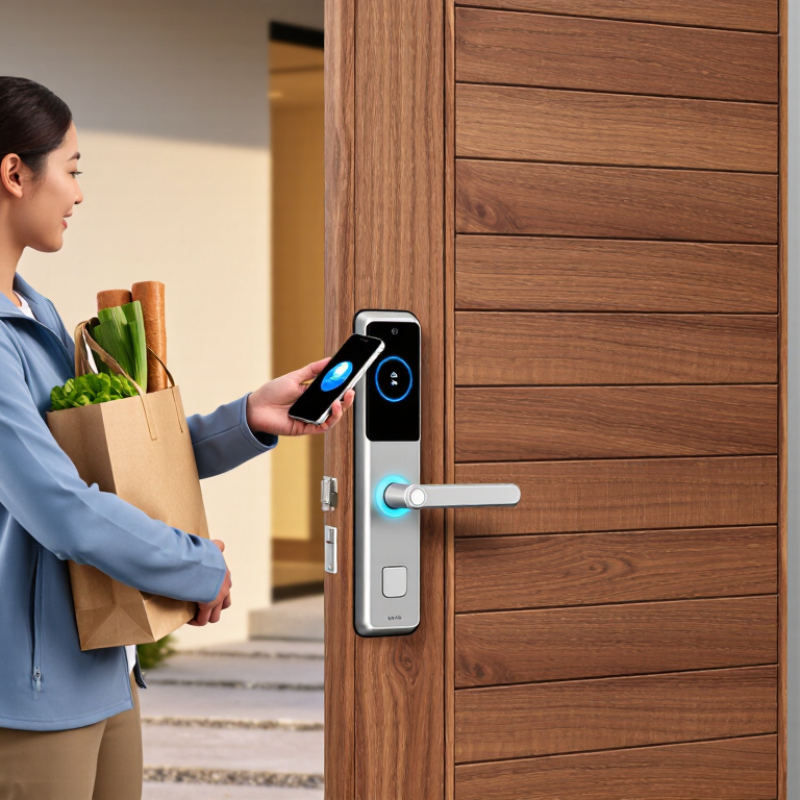
An NFC smart lock is only a good fit when its hardware matches your actual door. Check the door’s thickness, backset, handing, and deadbolt type before comparing features. Measure with a tape, then compare those numbers with the lock’s installation requirements. Also note whether the door is metal, unusually thick, or exposed to rain. Small details matter. A warped frame can still cause trouble, even when your measurements look right.
Think about who needs access and how often. Will residents tap a phone, an NFC card, or both? Keep a physical backup method available in case a phone battery dies or a guest cannot use NFC. Check whether lost credentials can be removed promptly, and whether access can be managed without an internet connection. NFC alone does not guarantee strong security; look for clear information about credential protection, activity records, battery warnings, and emergency power options. Convenience has limits. Test it twice.
Tips: Photograph the latch and measure the backset before shopping. Ask whether the lock works during Wi-Fi outages. If possible, test NFC at the actual door; a showroom demonstration may not reveal your setup’s quirks.
An NFC smart lock should match the devices you actually use, not just the features listed on its box. Check the exact lock model’s compatibility list. NFC support alone does not guarantee that a phone’s digital wallet can unlock it. Compatibility matters. Confirm whether the lock accepts phones, access cards, or key fobs, and whether these work when the phone battery is low. Test it in person if possible.
Look for clear details about supported phone models, operating systems, and wallet requirements. A lock may support NFC cards but not every phone-based credential. Check how credentials are added, removed, and shared with household members. If a phone is lost, you should be able to revoke its access without resetting every user. That matters. Also ask whether firmware updates can change device support; product pages may not explain this well.
Credential security deserves more than a claim that access is encrypted. Check whether the lock stores credentials in a protected component and uses secure communication between the reader and device. Prefer systems that let you manage access locally or through a well-documented account, with alerts for unusual activity. A useful test is to remove one credential and confirm that it stops working promptly. I would not assume a familiar-looking tap symbol means the setup is secure; the details are worth checking.
| Selection Dimension | What to Check | Why It Matters | Practical Recommendation |
|---|---|---|---|
| NFC frequency and card type | Check the lock’s supported NFC frequency, card technology, and credential format. Many contactless access cards operate at 13.56 MHz, but frequency alone does not guarantee compatibility. | Cards using the same frequency can still use different protocols or security methods and may not work with the lock. | Confirm the exact supported card types in the lock’s documentation before buying or reusing cards. |
| Smartphone compatibility | Verify the supported phone models, operating systems, and required access method, such as a dedicated app or a supported digital-wallet credential. | Having NFC hardware on a phone does not by itself mean the phone can act as a key for a particular lock. | Check the manufacturer’s current compatibility list and test the intended phone and access method where possible. |
| iPhone and Android support | Look for explicit support for the relevant iOS or Android version and the specific phone-based credential feature. | Phone access can depend on the operating system, app, wallet support, and lock configuration—not just NFC availability. | Do not assume that a feature available on one phone platform is also available on the other. |
| Credential security | Ask whether credentials use cryptographic authentication and protected keys, rather than relying only on a readable card identifier. | A system that accepts a static identifier alone may be more vulnerable to copying or replay than one that verifies a cryptographic response. | Prefer documented, cryptographically protected credentials. Avoid relying on UID-only cards for sensitive access. |
| Credential management | Check whether access credentials can be added, revoked, or reassigned, and whether these actions require an administrator account or local access. | Promptly revoking a lost phone or card helps limit continued access. | Choose a system with clear revocation procedures and keep an up-to-date record of issued credentials. |
| Offline operation | Determine whether the lock can verify an enrolled NFC credential without an internet connection and which features require connectivity. | Internet outages may affect remote management or notifications even when local credential verification still works. | Confirm offline behavior for both unlocking and credential changes; do not assume all functions work without a network. |
| Backup entry methods | Check for a practical fallback, such as a mechanical key, keypad, or another independent access method. | A dead phone, depleted lock battery, or unavailable credential could otherwise prevent entry. | Choose a backup method that household members can use and understand how to access it before an emergency. |
| Power and low-battery behavior | Review battery type, low-battery warnings, emergency power options, and what happens when the batteries are exhausted. | Electronic access depends on the lock having power, even if the NFC credential itself is valid. | Follow the documented battery replacement schedule and verify the emergency procedure before installation. |
| Door and installation fit | Confirm door thickness, backset, handing, lock type, and any installation requirements. | A compatible phone or card cannot compensate for a lock that does not fit the door or cannot be installed securely. | Measure the door and compare every required dimension with the installation guide before purchase. |
| Privacy and access records | Review what entry events are recorded, where records are stored, who can view them, and how long they are retained. | Access histories can reveal household routines and should be managed with appropriate privacy controls. | Choose a system with understandable data settings and restrict access to logs to authorized users. |
How to Choose an NFC Smart Door Lock?
An NFC smart lock is useful only when its lock body fits the door and its reader suits daily routines. Start by identifying the existing lock type: a deadbolt, a mortise lock, or a handle-integrated assembly. A replacement deadbolt may use the current bore, but its bolt dimensions still need to match. Retrofit models attach to the inside thumb-turn, so check that the turnpiece is accessible and unobstructed. Mortise locks need closer measurement because the latch, handle, and lock case share one cutout. Measure twice. A small mismatch can mean extra drilling or a lock that never sits flush.
Check door thickness, backset, handing, and the space around the frame before choosing a model. Also confirm whether the door opens inward or outward, and whether trim or a screen door blocks the reader. NFC credentials vary: some locks accept cards, while phone access depends on the lock and the phone’s capabilities. Do not assume every phone works. Check how the lock handles low batteries, and whether a mechanical key or external power option is available. During installation, test the latch with the door open, then closed. If the bolt scrapes, realign the strike plate rather than forcing it. I would not skip this step; a smooth-looking installation can still bind under pressure.
Compare lock types, installation needs, and door compatibility before choosing a lock.
Common US door thickness references: 1⅜ in (34.9 mm) for many interior doors and 1¾ in (44.5 mm) for many exterior doors. These are common nominal sizes, not a guarantee of lock compatibility.
Installation check: Retrofit deadbolts usually replace an existing deadbolt; mortise locks require a compatible mortise cutout; lever or handle locks may require different bore and latch preparations. Before buying, measure door thickness and check the lock’s supported thickness, backset, borehole, and edge preparation.
Power is easy to overlook until a lock beeps at a cold, dark doorway. Check the battery type, replacement process, and low-power warning time. Ask whether NFC credentials still work when the batteries are nearly empty, and look for an emergency power option. Small details matter. A warning that appears only in an app may be useless when the phone is elsewhere.
Connectivity shapes daily reliability. NFC works at close range, but remote alerts or access changes may depend on Bluetooth, Wi-Fi, or a gateway. Check what remains usable during an internet outage and whether activity records sync later. Test this before relying on the lock.
Access management deserves equal attention: individual credentials, temporary access, quick revocation, and clear entry logs help prevent shared codes from lingering.
Verizon’s 2024 Data Breach Investigations Report found that 68% of breaches involved a non-malicious human element, such as mistakes or social engineering. That finding concerns broad breach data, not smart locks specifically, but it underscores why simple, reviewable access controls matter.
Fancy features can still feel clumsy. Try the app and credential-removal process before choosing.
When comparing NFC smart door locks, check the exact model’s certification, not just the company’s general claims. Look for independent testing against relevant mechanical and electronic-lock standards, and confirm what the certificate covers: the cylinder, forced-entry resistance, electronics, or all three. NIST’s IoT cybersecurity baseline, IR 8259A, describes six core capabilities, including device identification, data protection, access control, and secure software updates. Use it as a checklist, not a guarantee. A certified lock can still be poorly installed.
Warranty terms deserve a close read. Check coverage for the reader, motor, battery contacts, and app-related functions; note exclusions for installation and water damage. Then estimate total ownership cost over several years: purchase price, compatible cards, batteries, installation, subscriptions, and any replacement parts.
Verizon’s 2024 Data Breach Investigations Report found that 68% of breaches involved a human element, such as errors or social engineering. That figure is not specific to door locks, but it is a reminder to review account recovery and access-sharing controls.
I would also ask how long security updates are promised. It is easy to overlook that detail when a keypad looks reassuring. A small spreadsheet can reveal whether a low upfront price hides recurring fees.


