

A 24 Port Fiber Termination Box is used to terminate, organize, protect, and manage fiber optic cables in one accessible enclosure. It commonly serves as the connection point between outside plant cables and indoor distribution equipment. Technicians can splice incoming fibers, secure adapters, and connect patch cords without leaving exposed strands on a rack or wall.
The “24 port” capacity usually supports up to 24 fiber termination positions, depending on the adapter type and box design. SC, LC, and other connector formats may be available. Inside, splice trays, cable clamps, routing guides, and protective sleeves help control bending and reduce accidental damage. Small details matter. A sharply bent fiber can weaken the optical signal.
Jim Hayes, founder and president of the Fiber Optic Association, states, “Fiber optic enclosures protect, organize, and manage fiber connections.” This practical principle explains the box’s value in offices, data centers, telecommunications rooms, security systems, and industrial networks. It supports cleaner installations and makes testing or replacement more efficient.
However, a 24 Port Fiber Termination Box does not improve a poor cable design by itself. It cannot correct excessive loss, incorrect splicing, or weak installation practices. I may be simplifying the issue, but the enclosure is only one part of a reliable fiber system. Proper labeling, bend-radius control, grounding where required, and careful inspection remain essential. A well-installed box should feel orderly, not crowded, when the front cover is opened.
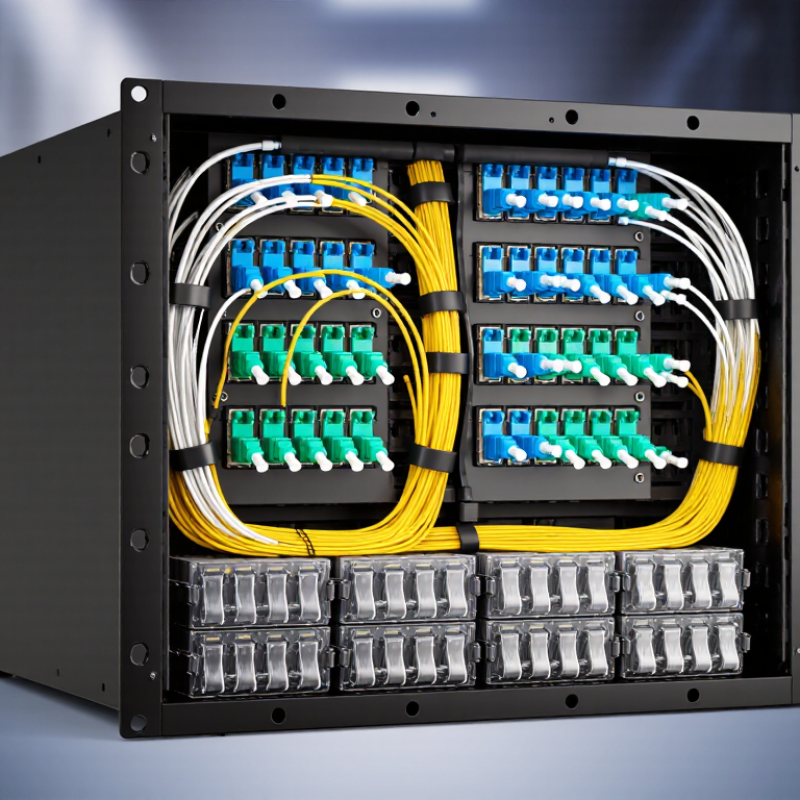
What Is a 24 Port Fiber Termination Box Used For?
A 24-port fiber termination box is an enclosure designed to hold 24 fiber adapters. Its capacity defines the box more clearly than its external size. Each adapter provides a stable connection point for fiber connectors, allowing technicians to patch, test, and reorganize links safely.
It is commonly installed between incoming fiber cables and active network equipment. Inside, the box may include splice trays, pigtail storage, cable clamps, and bend-radius guides. These parts protect exposed fibers from pulling, sharp bends, and accidental movement. A duplex adapter can support two fiber positions, so the actual fiber count may reach 48. Always check the product specification.
The number matters in real installations. A technician can label ports from 1 to 24 and trace a connection without opening several cabinets. This helps in data rooms, building distribution points, and access networks. It is not a splitter. Space matters. A cramped box can make testing slow and increase handling errors.
A common mistake is choosing the box only by adapter count. Cable entry direction, connector type, splice capacity, and mounting method also affect performance. I would leave room for service loops and future changes, even when the cabinet looks spacious. That assumption can be wrong. Inspect the bend radius and grounding arrangement before installation. Loose labels or poor slack management may create problems months later.
A 24-port fiber termination box organizes fiber cables where they enter a network cabinet or distribution point. It provides a controlled space for splicing, termination, and adapter management. Inside, technicians can join incoming fibers to pigtails through fusion splicing. The finished connections then reach adapters on the front panel. This arrangement protects delicate fibers and makes port identification easier during maintenance.
Each port should have a clear label, suitable bend radius, and enough slack for future repairs. Spliced fibers are stored in trays, while adapters keep connectors aligned and protected from dust. In practical installations, careful routing reduces strain and prevents sharp bends. A crowded box can still work, but troubleshooting becomes slower and riskier. I have found that neat cable dressing saves more time than expected, although perfect layouts are rarely maintained for long.
Tips: Leave service loops for testing and re-splicing. Record every port, cable route, and fiber destination. Inspect connector end faces before mating them. Keep unused adapters covered. Check splice trays after major changes, because one misplaced fiber can confuse an entire link. Use measured bend limits from the cable manufacturer, not guesswork. Small errors matter.
| Data Dimension | Typical Specification or Value | How It Is Used | Practical Notes |
|---|---|---|---|
| Port capacity | Up to 24 fiber adapter positions | Provides organized connection points for incoming and outgoing fiber circuits. | The actual fiber count depends on the adapter type and whether simplex or duplex adapters are installed. |
| Supported connector arrangement | Commonly 24 simplex adapters or 12 duplex adapters | Allows the box to support different patching densities and connector configurations. | Compatibility must be checked for connector type, adapter cutout, polarity, and mounting method. |
| Fiber splicing | Fusion splicing or mechanical splicing | Joins the permanent outside-plant or distribution cable fibers to pigtails inside the box. | Fusion splicing generally provides lower and more consistent splice loss than mechanical splicing. |
| Splice tray organization | Dedicated tray or splice-management area | Protects splice sleeves and maintains the minimum bend radius of routed fibers. | Fiber routing should avoid sharp bends, excessive tension, and pressure on splice sleeves. |
| Cable termination | Up to 24 terminated fiber circuits, depending on configuration | Converts loose cable fibers into protected, accessible connectorized links. | Pigtails, fan-out assemblies, or pre-terminated modules may be used for termination. |
| Adapter management | Front-accessible adapter panels | Keeps adapters aligned and makes patch-cord insertion, removal, and inspection easier. | Unused positions can be fitted with protective dust covers to reduce contamination. |
| Cable entry | Top, bottom, rear, or side entry, depending on enclosure design | Routes feeder, distribution, and drop cables into the termination area. | Cable glands, strain-relief clamps, and sealing components help protect the entry point. |
| Cable strain relief | Mechanical clamp or anchoring bracket | Transfers pulling force to the enclosure rather than to splice joints or connectors. | The clamp size must match the cable diameter and construction. |
| Fiber identification | Port labels, fiber numbering, and cable identification tags | Helps technicians trace circuits from the incoming cable to the active equipment or patch panel. | Consistent labeling reduces troubleshooting time and prevents incorrect patching. |
| Patch-cord routing | Front routing with bend-control features | Maintains orderly connections between the termination box and network equipment. | Patch cords should not be tightly coiled or bent below the manufacturer’s specified radius. |
| Optical loss control | Typical connector loss: approximately 0.2–0.5 dB per mated pair; splice loss is often about 0.05–0.2 dB when properly installed | Provides a controlled transition between permanent cable sections and removable patch connections. | Actual values vary with connector cleanliness, alignment, fiber type, and installation quality. |
| Testing access | Visual inspection, optical power meter, and optical time-domain reflectometer testing | Supports link verification, fault location, loss measurement, and maintenance checks. | Connector end faces should be inspected and cleaned before optical testing or reconnection. |
| Mounting locations | Wall-mounted, rack-mounted, cabinet-mounted, or distribution-box installation | Provides a fixed transition point in telecommunications rooms, access networks, buildings, and data facilities. | The enclosure should be installed where cable access, clearance, and environmental conditions are suitable. |
| Environmental protection | Enclosure protection varies by design; indoor and outdoor versions are available | Shields splices and connections from dust, accidental contact, and, where rated, moisture or weather exposure. | The required ingress-protection rating depends on the installation environment and local standards. |
| Primary network role | Splice, terminate, protect, identify, and distribute fiber circuits | Creates an organized interface between backbone, feeder, distribution, and equipment-side fiber cables. | It is a passive fiber-management component and does not amplify, switch, or electrically power the optical signal. |
What Is a 24 Port Fiber Termination Box Used For?
A 24-port fiber termination box organizes, protects, and connects up to 24 fiber ports. It supports splicing, adapter mounting, polarity control, and orderly patching inside a rack or wall cabinet. Technicians can separate incoming cables from active equipment, reducing stress on delicate fiber strands. This structure also makes fault tracing faster during maintenance.
Reliable links depend on more than port capacity. TIA-568.3-D defines optical-fiber cabling practices, performance requirements, polarity, and testing methods. IEC 61754 specifies connector interface geometry, helping compatible adapters and plugs mate correctly. The standards work together, but they do not replace skilled installation. The FOA’s industry guidance repeatedly stresses clean end faces, correct bend radius, and inspection before testing. A single dust particle can increase insertion loss. Small errors matter.
Tips: Keep a port map inside the box. Label both cable ends. Inspect and clean every connector before mating. Test insertion loss and return loss after splicing. The 2024 Uptime Institute Global Data Center Survey reported that 54% of respondents experienced an outage in the previous three years. Fiber faults are not always the main cause, but weak documentation can extend recovery time. In practice, no termination is perfect; installers should review test records instead of trusting a glowing link light.
A 24-port fiber termination box organizes and protects up to 24 fiber connections inside a compact enclosure. It normally holds adapters, splice sleeves, routing guides, and a bend-control area. For OS2 single-mode fiber, the key verification target is attenuation: no more than 0.4 dB/km at 1310 nm and 1550 nm. This value appears in widely used ISO/IEC 11801 cabling requirements and aligns with the ITU-T G.652.D fiber recommendation.
Distance matters.
A 24-port box does not create optical loss by itself, but poor splicing, dirty end faces, tight bends, and weak connector engagement can increase link attenuation. For example, a 2 km OS2 link should theoretically remain near 0.8 dB fiber attenuation before connectors and splices are added. Field technicians should test both wavelengths with an OLTS, then inspect events with an OTDR. IEC 61280-4-2 testing guidance supports this two-part approach.
Do not treat 0.4 dB/km as a guaranteed field result. Real cables age, installation conditions vary, and measurement uncertainty can hide small defects. I would record launch conditions, reference methods, connector counts, and ambient temperature with every test. A clean end face is often more valuable than another specification sheet. The 24-port enclosure should also preserve bend radius, because a crowded tray can produce localized loss that disappears when the fibers are rearranged.
A 24-port fiber termination box organizes, protects, and terminates up to 24 fiber connections, providing a structured interface between incoming optical cables and patch cords or equipment.
The chart shows the maximum theoretical attenuation for OS2 single-mode fiber at 0.4 dB/km at both 1310 nm and 1550 nm. Values exclude connector, splice, and termination losses.
A 24-port fiber termination box provides a controlled point for splicing, terminating, and routing optical fibers. With duplex LC adapters, it can organize up to 48 fibers in a compact enclosure. Each adapter handles two fiber positions, supporting separate transmit and receive paths. This layout suits data centers, telecom rooms, and building distribution frames where rack space is limited.
The FTTH Council Global Alliance’s 2024 Global Deployment Report recorded more than 1.8 billion homes passed by fiber worldwide at the end of 2023. That scale increases the need for clear port identification and dependable fiber management. Technicians commonly route incoming backbone fibers into splice trays, then connect short LC patch cords to active equipment. Labels should show cable origin, destination, fiber number, and service status. Small details matter.
A good box also protects bend-sensitive fibers. Maintain the manufacturer’s minimum bend radius, leave service slack, and separate incoming cables from patching paths. Poor slack control can create microbends and intermittent loss. It happens more often than expected. Professional installation should include connector inspection, end-face cleaning, polarity checks, and insertion-loss testing. IEC 61300-3-35 provides a recognized method for inspecting fiber-optic connector end faces. The 24-port format is efficient, but not automatically sufficient; dense networks may need extra space for future circuits, thicker cables, or difficult maintenance access.


