
• Gantry Robot Manufacturer & Articulated Arm Integrator

10 Tips for Choosing Automated Storage Solutions?

Choosing automated storage solutions is not simply a technology decision. It is a practical investment in space, accuracy, safety, and daily workflow.

A useful principle from John Paxton, former CEO of MHI, is: “Automation is not a substitute for strategy; it is an amplifier of it.” This idea deserves attention. A fast system cannot repair poor inventory data. Nor can a robotic shuttle solve unclear picking rules. The strongest projects begin with measured facts, not impressive demonstrations.

This guide presents ten practical tips for choosing the right solution. It considers storage density, order profiles, product dimensions, throughput, integration, maintenance, and workforce needs. Picture a warehouse aisle shrinking from twelve feet to several compact modules. Imagine operators retrieving cartons without walking hundreds of unnecessary steps. These details affect return on investment.

Experience also reveals uncomfortable truths. Some companies automate too early. Others select equipment that fits today’s volume but struggles during seasonal peaks. That mistake can become expensive. A careful review should include SKU growth, peak-hour demand, fire protection, emergency access, and training requirements. Vendor promises need testing.

The best automated storage solutions are measurable and adaptable. They should reduce travel, protect inventory, and provide dependable access. Yet no system is perfect. Downtime still happens. Software still needs disciplined management. Human oversight remains essential.

The following tips will help decision-makers compare options with clearer expectations, stronger evidence, and fewer costly surprises.
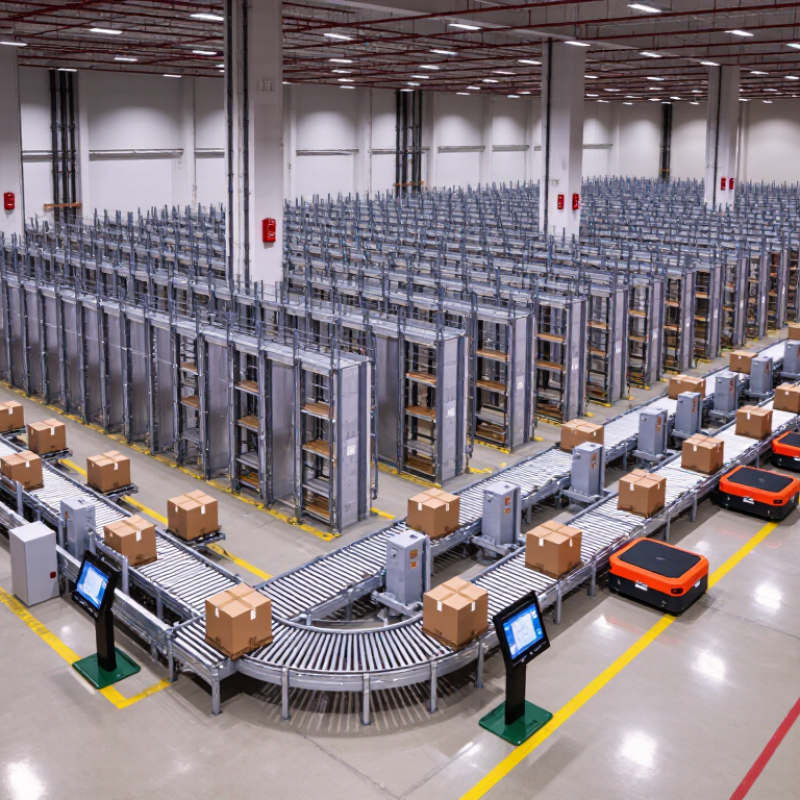
10 Tips for Choosing Automated Storage Solutions?

Define Your Storage Goals and Operational Requirements

Tip 1: Define your storage goals before comparing automated systems. Measure daily order volume, peak periods, SKU counts, item dimensions, and average retrieval times. A clear baseline prevents impressive technology from solving the wrong problem. Your target may be faster picking, better space use, fewer errors, or safer handling.

Tip 2: Map your operational requirements in detail. Record aisle widths, ceiling height, floor strength, temperature conditions, and available utility connections. Note how often workers access each item. Fast-moving goods need convenient locations, while slow-moving stock can tolerate longer retrieval times. Include future growth, but avoid paying for capacity you may never use.

Tip 3: Study exceptions, not only normal workflows. Damaged packaging, urgent orders, inventory checks, and seasonal spikes can expose weak designs. My early planning efforts sometimes focused too heavily on average performance. That was a mistake. Ask how the system responds when data is incomplete or equipment needs maintenance. It should support safe manual intervention and clear recovery procedures.

Tip 4: Involve the people who operate the storage area daily. Their practical experience can reveal awkward reaches, repeated walking, and unclear labeling. Confirm integration needs with inventory and order-management systems. Request measurable performance assumptions, training requirements, service responsibilities, and energy estimates. Reliable decisions come from documented evidence, not confident promises.

Assess Available Space, Layout, and Storage Capacity

10 Tips for Choosing Automated Storage Solutions

Assess available space before comparing equipment. Measure clear height, aisle widths, columns, doors, floor slopes, and service access. A warehouse may look spacious, yet fire systems, lighting, and structural beams can remove valuable storage volume. Tip 1: Create a scaled layout, not a rough sketch. Mark inbound and outbound paths, emergency routes, workstation positions, and future expansion zones. Tip 2: Protect operating space. Automated equipment needs maintenance clearance and safe access around moving components.

Calculate storage capacity from real inventory data. Count active stock-keeping units, average quantities, peak quantities, product dimensions, and weight. Do not design around average demand alone. Busy seasons expose weak assumptions. Tip 3: Separate fast-moving items from slow-moving inventory in the layout. Tip 4: Check whether containers, pallets, or shelves can handle actual loads without wasted height. Small differences matter. A 50-millimeter gap, repeated across many levels, can remove hundreds of storage positions.

I have seen projects fail because the proposed system fit the building but blocked material flow. Tip 5: Simulate daily movements before approval. Include replenishment, picking, returns, inspections, and equipment servicing. Tip 6: Confirm floor loading, power capacity, temperature limits, and network reliability with qualified specialists. One overlooked constraint can create expensive redesign work. I would also review the plan with operators; their practical objections may reveal problems that drawings miss. The first layout is rarely perfect.

Compare Automation Technologies and System Features

10 Tips for Choosing Automated Storage Solutions

Compare automation technologies by the work they must perform, not by impressive specifications. A shuttle system can move dense totes quickly, while vertical lifts use height to save floor space. Robotic mobile units offer flexible routing, but traffic control becomes critical during peak hours. Fixed conveyors provide predictable movement, although layout changes may become expensive. MHI’s 2024 Annual Industry Report found that 55% of supply chain leaders planned to increase technology investment. That commitment deserves disciplined comparison. Examine throughput, storage density, retrieval time, noise, maintenance access, and energy use. Check whether the control software supports warehouse management integration, live inventory data, alarms, and manual recovery. Small details matter. A jammed tote should not stop an entire aisle.

System features also need testing under realistic conditions. Request demonstrations using your carton sizes, damaged labels, seasonal volumes, and actual picking rules. Deloitte’s 2024 Smart Manufacturing Survey reported that 92% of surveyed leaders view smart manufacturing as a major competitiveness driver within three years. Yet automation does not remove operational risk. It can relocate risk into software, sensors, networks, and staff training. Review cybersecurity controls, spare-part availability, service response times, and expansion limits. Ask for measured performance, not optimistic capacity claims. My own preference is to compare five-year operating costs beside purchase prices. That view is less exciting. It is usually more honest. A system that performs brilliantly in a clean trial may struggle beside dusty floors, rushed operators, and incomplete data.

Planning comparison of common automated storage technologies. Scores range from 1 (lower suitability) to 5 (higher suitability) and reflect typical system characteristics: storage density, throughput, SKU flexibility, scalability, and picking accuracy. Actual performance depends on layout, inventory profile, order patterns, and system configuration.

Evaluate Integration, Safety, Maintenance, and Scalability

Choosing Automated Storage Solutions: 10 Tips for Integration, Safety, Maintenance, and Scalability

A serious evaluation begins with system integration. Confirm compatibility with warehouse software, barcode standards, inventory data, and existing conveyors. Request a live demonstration using your actual product sizes and order patterns. The MHI 2024 Annual Industry Report found that 83% of supply chain professionals expect technology adoption to accelerate. Integration gaps can erase that advantage. Check API ownership, data recovery, cybersecurity controls, and manual workarounds. A practical test should follow one tote from receiving to dispatch. If operators still retype information, the design needs revision.

Safety requires more than emergency buttons. Inspect guarding, access doors, lighting, noise, and pedestrian separation on the proposed layout. The U.S. Bureau of Labor Statistics reported 4.8 recordable injury cases per 100 full-time workers in transportation and warehousing during 2023. Ask for risk assessments, training records, inspection intervals, and documented incident procedures.

Maintenance planning should include spare parts, remote diagnostics, service access, and measurable response times. McKinsey reports that predictive maintenance can reduce machine downtime by 30% to 50%, but sensors alone cannot fix weak procedures.

Scalability deserves equal scrutiny. Model peak seasons, future product dimensions, labor changes, and energy capacity. Avoid buying maximum capacity too early. I have seen “future-ready” layouts become expensive, underused islands. The better question is whether expansion can occur without stopping daily operations. Check modularity, software licensing, floor loading, and supplier support commitments before signing.

Calculate Total Costs and Select the Best-Fit Solution

10 Tips for Choosing Automated Storage Solutions: Calculate Total Costs and Select the Best-Fit Solution

The purchase price is only the visible part of an automated storage project. Calculate equipment, software, installation, training, maintenance, energy, and integration costs. Include floor reinforcement, network upgrades, safety checks, and temporary labor during commissioning. A small missing item can distort the business case. It happens often.

Use five-year total cost of ownership, not a quick payback estimate. Compare annual savings from labor, space, accuracy, and reduced product damage. Then test the figures against real order profiles, including weekend peaks and slow seasons. The MHI 2024 Annual Industry Report identifies labor availability and implementation complexity as continuing supply-chain concerns. These risks deserve a monetary value. The International Federation of Robotics reported 541,302 industrial robots installed worldwide in 2023, showing strong automation momentum, but warehouse needs differ from factory needs.

Request performance data from suppliers using your own SKU dimensions, weights, order lines, and replenishment patterns. Ask how the system behaves when a lift is unavailable or software communication fails. A perfect simulation can still miss messy aisles, unstable cartons, or seasonal congestion. I have seen optimistic models ignore operator walking time, then overstate savings. Recheck every assumption with warehouse staff. Choose the solution that fits today’s constraints and tomorrow’s volume, without buying capacity that remains idle.

10 Tips for Choosing Automated Storage Solutions? - Calculate Total Costs and Select the Best-Fit Solution

Planning basis: The figures below are indicative planning ranges in USD for a medium-sized facility. Actual costs depend on building conditions, payload, throughput, safety requirements, software integration, labor rates, and installation complexity.
No. Decision Area What to Measure Typical Planning Benchmark Cost Consideration Best-Fit Guidance
1 Define SKU and load characteristics SKU count, item dimensions, unit weight, carton stability, and storage condition. Record at least 12 months of SKU data; include peak-season values. Oversized or irregular loads may require stronger equipment, larger bins, and lower storage density. Use vertical lifts or unit-load systems for standardized goods; use carousels or tote systems for smaller items.
2 Calculate required capacity Required storage locations, reserve capacity, and future growth allowance. Plan for 15–25% additional capacity above current demand. Too little capacity creates expansion costs; too much capacity increases unused capital and floor-space costs. Select a modular system when demand or product mix is expected to change.
3 Match throughput to demand Average and peak picks per hour, replenishment cycles, and order-line profile. Size for peak throughput, not average throughput; maintain 10–20% operating headroom. Higher throughput usually increases equipment, controls, software, and maintenance costs. Choose horizontal carousels for moderate batch picking and higher-speed systems for sustained peak demand.
4 Measure available floor space Usable floor area, clear height, columns, fire exits, loading zones, and aisle constraints. Compare usable cubic volume, not only floor area; verify clear height and floor loading. High-density automation can reduce expansion or rental costs but may require structural and fire-protection work. Vertical systems are generally valuable where floor space is limited and ceiling height is available.
5 Compare labor savings Travel time, search time, replenishment labor, error correction, and supervisor workload. Target measurable reductions in travel and search activity rather than assuming full labor elimination. Net labor savings should include training, support, overtime changes, and any new control-room roles. Goods-to-person systems are most attractive where order picking currently involves long walking distances.
6 Include the complete initial investment Equipment, conveyors, safety guarding, software, installation, electrical work, testing, and training. Add a 10–15% contingency for site changes and integration requirements. A low equipment quote may exclude interfaces, construction, commissioning, or operator training. Request an itemized total installed cost with clearly stated exclusions.
7 Estimate operating and maintenance costs Preventive maintenance, spare parts, software support, electricity, inspections, and downtime. Model annual maintenance at approximately 3–8% of equipment purchase cost as an early estimate. Maintenance contracts, critical spares, and response times can materially affect total cost of ownership. Favor solutions with accessible service points, documented spare-part policies, and clear uptime targets.
8 Verify software and system integration Compatibility with warehouse, enterprise, order-management, barcode, and reporting systems. Define interfaces, data ownership, exception handling, and response-time requirements before purchase. Custom integration can add project cost and extend deployment time if data standards are unclear. Select open, documented interfaces and require realistic end-to-end testing with production-like data.
9 Check safety, ergonomics, and compliance Guarding, emergency stops, access control, lifting risk, operator reach, noise, and local regulations. Complete a documented risk assessment before final design approval. Safety upgrades are cheaper during design than after installation or an operational incident. Give preference to designs that minimize manual lifting, unnecessary walking, and unauthorized access.
10 Calculate payback and scalability Initial investment, annual savings, avoided expansion, productivity gains, residual value, and risk. Payback = Initial Investment ÷ Annual Net Benefit; test conservative, expected, and high-growth cases. Include financing cost, inflation, downtime, software renewals, and future expansion modules. Choose the solution with the strongest risk-adjusted value, not simply the lowest purchase price.

Total Cost of Ownership Framework

Cost Category Included Items Planning Method Commonly Missed Items
Initial investment Automation equipment, storage media, controls, safety systems, software, installation, and commissioning. Use a supplier-issued total installed cost. Site preparation, electrical upgrades, fire protection, permits, and data cleansing.
Annual operating cost Labor, electricity, software support, inspections, consumables, and routine maintenance. Estimate by month and apply peak-season adjustments. Training refreshers, cybersecurity controls, spare parts, and temporary labor during downtime.
Financial benefit Reduced travel, fewer picking errors, lower space requirement, improved throughput, and avoided expansion. Compare annual benefits against the current-state baseline. Quality improvements that are not converted into measurable financial values.
Risk allowance Implementation delays, demand changes, integration issues, and equipment downtime. Use conservative, expected, and high-performance scenarios. Single-source dependencies, limited service coverage, and lack of expansion capacity.
Selection rule: Choose the solution that meets peak throughput and capacity requirements while delivering acceptable total cost of ownership, operational resilience, safety, integration readiness, and scalability.